AWS Marketplace: What Good Looks Like in 2026
Marketplace has changed more in the last two years than in the five before it.
Buy with AWS. Express private offers. AWS sellers who can now see which partners can price a deal on the spot.
The listing is no longer a billing endpoint. It is a storefront, a sales assistant and, increasingly, a signal to the AWS field.
Most listings haven’t kept up. I spent part of this week clicking through them, and it is now very clear which listings are being maintained against current best practice, and which have been left to go stale.
So as we close out 2026, here is what good actually looks like, using screenshots from live listings, and why each element matters.
1. Build four doors, not one
Start with what a well-built listing looks like in 2026:
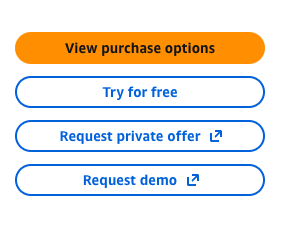
For a SaaS offering, this is the baseline for 2027. Four calls to action, each mapped to a different stage of the buying journey:
Try for free for the technical evaluator who wants hands-on proof before anyone talks to sales.
Request demo for the champion who needs to see it properly before taking it upstairs.
Request private offer for the buyer who is ready but needs their own price, term or EULA.
View purchase options for the buyer who has already decided.
The point is not the buttons. It is that every visitor, at every stage, has a next step that keeps them inside the AWS procurement flow.
Now compare it with an out-of-date listing:
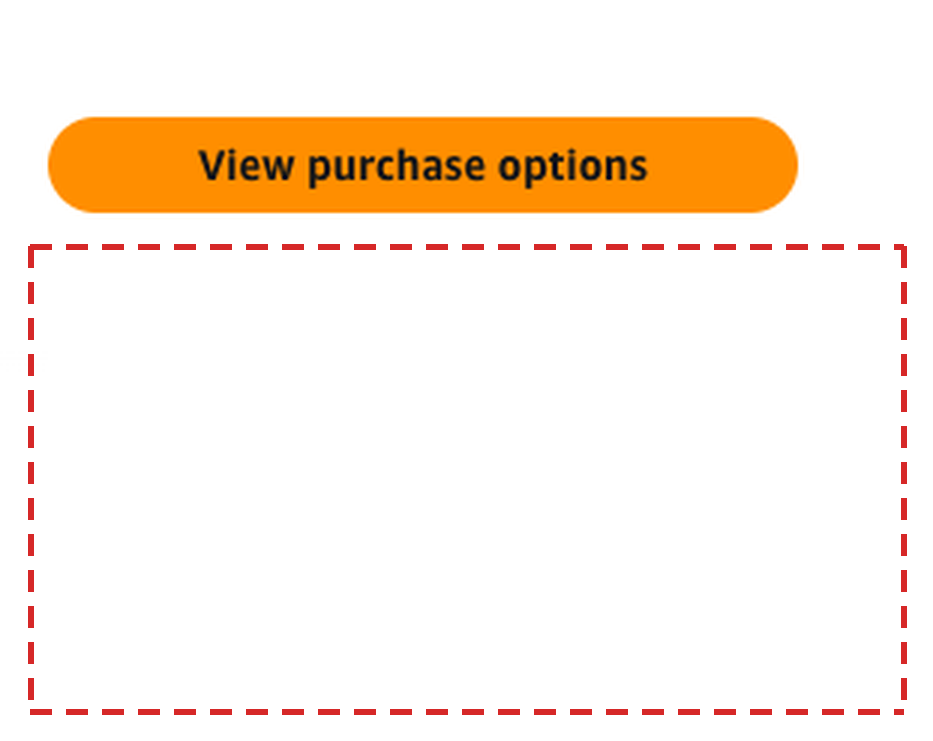
A purchase option, and nothing else. The white space underneath tells you exactly what this listing is for.
Its only real purpose is to be an alternate transaction layer: somewhere to close a deal that was already sourced and negotiated outside of AWS Marketplace. The buyer arrives already knowing the product, the price and the dimension, because your sales team told them.
That still has value. But it treats Marketplace as the end of the funnel, not the start.
Best practice for SaaS offerings is now to use Marketplace as top of funnel too. The free trial, the demo request and the private offer request are how an AWS customer who has never spoken to you becomes pipeline you didn’t have to source yourself.
A listing with only a purchase option is a checkout page. The listing above it is a storefront.
2. Put the free trial in the pricing section, not the small print

The best listings treat the trial as a pricing option in its own right. It sits at the top of the Pricing section, with its own button, before the buyer has to look at a single dimension.
Why it matters: a trial subscribed through Marketplace is a buyer who has already used their AWS account to engage with you. Converting that to paid is a procurement step, not a new vendor onboarding.
It is also the cleanest trigger for early co-sell you will get. A buyer who starts a trial through Marketplace has shown clear propensity to buy, inside their own AWS account. That is a qualified co-sell opportunity.
And it is the perfect excuse to engage the AWS account manager. Log it in ACE, bring them in while the trial is live, and work the paid deal together.
If your trial lives behind a form on your own website, you have handed a warm Marketplace visitor back to a cold funnel.
3. Publish pricing a buyer can actually read
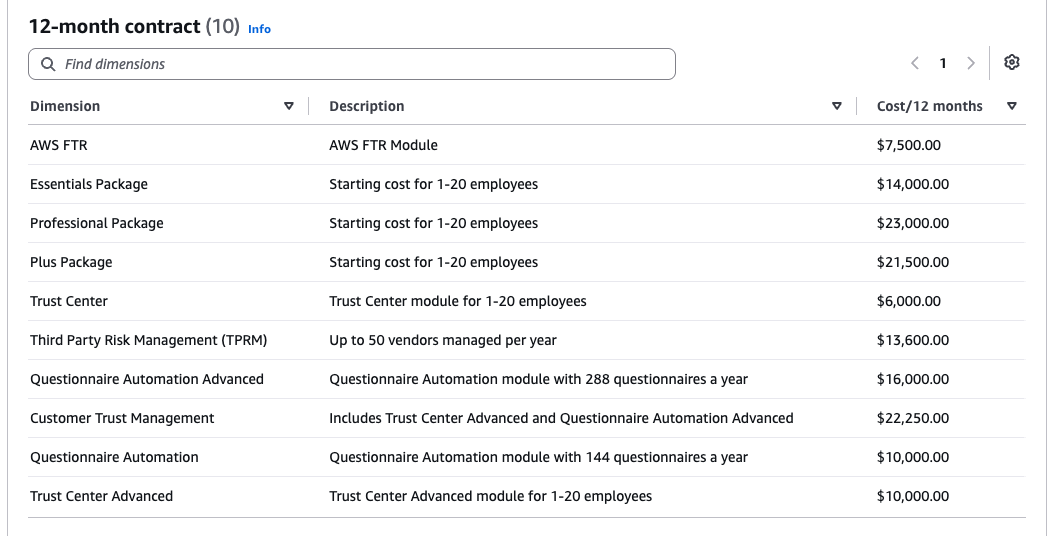
Ten dimensions. Each one named the way a buyer thinks about the product: packages, add-on modules, usage tiers. Each one with a starting price and a plain description of what it includes.
This does two jobs. It lets a buyer self-qualify on budget before they ever request a demo. And it gives the AWS seller something concrete to point at when a customer asks “roughly what does this cost?”
Compare that with the listings that show a single dimension at $1 and say “contact us for pricing.” That is not a pricing strategy. It is a signal that the listing exists for private offers only, and the open market should look elsewhere.
Multiple dimensions like this also give the customer the ability to buy here and now. No sales call, no private offer, no waiting.
That won’t apply to every enterprise deal, and some companies genuinely won’t see self-serve as a valid strategy for them. But if your product can be bought self-serve at certain tiers, you certainly want those tiers on the listing.

Then give them a reason to commit longer. Three tabs, 12, 24 and 36 months, with the saving printed on the tab itself.
The discount is small. That is the point. A 2 to 4% saving costs you very little, but it hands the procurement team a ready-made justification for a multi-year term. And a multi-year Marketplace contract is a bigger drawdown against the customer’s AWS commitment, which is exactly the outcome the AWS account team is measured on.
4. Get express private offers live before re:Invent
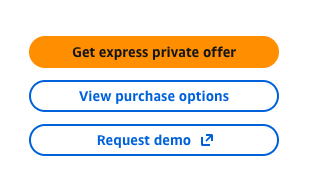
If I had to pick one screenshot that defines what good looks like in 2026, it is this one. The primary call to action is no longer “View purchase options.” It is “Get express private offer.”
The mechanics, briefly. AWS launched express private offers at re:Invent 2025. The seller pre-configures a rate card: dimensions, discount boundaries, contract duration limits. The buyer answers a few questions, and AWS generates a private offer against those rules in minutes. Anything outside the rules routes to your sales team.
That alone removes weeks of back-and-forth on smaller deals. But the bigger shift came in June. AWS extended express private offers into co-sell. AWS sellers can now see which partners have them enabled, and invite a customer to receive personalised pricing directly.
Read that again from the AWS seller’s side. They are measured on consumption, not on how many partner introductions they make. Given two comparable solutions, one where they can get the customer a price today and one that needs a discovery call and a three-week negotiation, which do you think they recommend?
This is the co-sell argument I have been making all year, now built into the product. Your Marketplace configuration is part of your co-sell motion.
One practical note on setup: AWS requires each dimension on an express private offer rate card to carry a detailed description, minimum 250 characters. Keep the public listing short and scannable. The rate card is where the detail goes.
5. Let the listing sell when nobody is in the room

A two-minute product video at the top of the Overview does the job your SE does on a first call. It explains the product before anyone has to book time.
Most Marketplace visitors never talk to you. They are evaluators sent by their AWS account team, procurement checking a vendor, or a champion forwarding a link. The video is your pitch to all of them.
If your Overview is three paragraphs of copy pasted from your homepage, you are asking a busy buyer to do the work.
6. Take the storefront to your own website
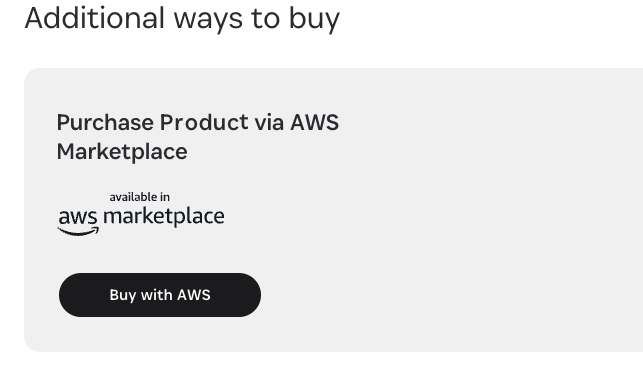
Buy with AWS launched in December 2024, and two years on, too few ISVs use it. It puts a Buy with AWS button on your own pricing page. Buyers transact with their AWS account, the purchase runs through Marketplace, and they keep consolidated billing.
The program also offers Try free with AWS, Request private offer and Request demo buttons. Those are the same four doors from section 1, now on your own site.
There is no added cost beyond standard listing fees. If your website traffic includes AWS customers, and it does, you are leaving the easiest procurement path off the page where they decide.
7. Connect the invisible pieces
Everything above is the part buyers see. What makes it work is the part they don’t.
The first is CRM integration. When a trial starts, a private offer is requested or an express private offer is accepted, that signal needs to land in your CRM as an ACE opportunity, not sit in a Marketplace report nobody checks. The AWS Partner CRM Connector for Salesforce and the HubSpot integration with Partner Central do exactly this, so your reps work co-sell from the tool they already live in.
The second is newer. In March, AWS launched Partner Central agents, with a fully managed MCP server behind them. Connect it to your CRM or AI tools and your team can query pipeline, get next-step recommendations grounded in AWS co-sell standards, and draft funding requests without logging into Partner Central.
None of this shows up on the listing. But it is the difference between a Marketplace signal that becomes a co-sell deal and one that goes cold in a dashboard.
The 2027 Scorecard
Open your own listing in an incognito window and check it against these seven:
- Four CTAs: try, demo, private offer, buy
- A free trial shown in the Pricing section
- Named dimensions with real descriptions and starting prices
- 24 and 36-month terms with a visible saving
- Express private offers enabled
- A product video in the Overview
- Buy with AWS on your own pricing page
Bottom Line
Your Marketplace listing is no longer a billing endpoint you set up for one big customer. It is where buyers evaluate you, and where the AWS seller decides whether you are easy to recommend. Every missing door is a buyer who leaves. Every manual step is a deal the field routes to someone faster. Fix the listing before re:Invent, because 2027’s co-sell motion starts there.
Tip of the Week
Count your doors. If the answer is one, add a free trial or Request demo CTA this week, then start drafting your express private offer rate card.
One to Read: AWS’s own guide, Want more deals from AWS sellers? Enable Express Private Offers, on the AWS Marketplace blog. It walks through setup and how express private offers feed your visibility to AWS sales.
Thanks for reading. If you open your listing and find only one door, that’s exactly the kind of conversation I enjoy having. Feel free to reach out.